Product Updates

New in Backstroke: More of Your Brand, Less Cleanup
Have more of what makes your brand yours, built right into Backstroke, with less rework between your creative and campaigns.
Small details make an email feel like your brand. The right font, a deliberately stacked offer, your own photography, your voice, your logo placement. It all adds up. This month's updates give you more control over those details in Backstroke. You’ll rebuild less as you move from creative to campaign.
In Optimizely's June 2026 survey of 2k+ marketing leaders, 76% said they spend at least three hours a week editing, fact-checking or correcting AI output. 25% said they frequently or always publish AI content they know isn't fully on-brand when deadlines hit.
The holiday season is no time to pay that tax. Here's how our latest product updates have made it a thing of the past.
Make the Whole Hero Feel Like Your Brand
Now more of your finished hero can be built, and kept editable, right inside Backstroke.
Style the words that matter. Highlight words to mix fonts and colors, or apply bold and italic when those font files are uploaded. Choose your line breaks and adjust sizing of individual lines.
Add the details the layout needs. Extra headings, subheadings and small text in your brand's fonts make room for offer terms, pre-headlines and supporting copy. Your Brand Config logo can get moved and resized exactly where you want it.
Build promotional layouts with Combos. Eleven styles cover offers, lead-in headings, word stacks and promo-code boxes. Change words or swap styles without retyping, as all parts stay aligned in your brand's fonts.

Build an offer in your brand's typeface, then adjust the words and layout in place.
Work With a Single Hero or Bulk Create. Apply changes across a set of hero variants, or edit one variant without losing its individual changes when the set changes later.
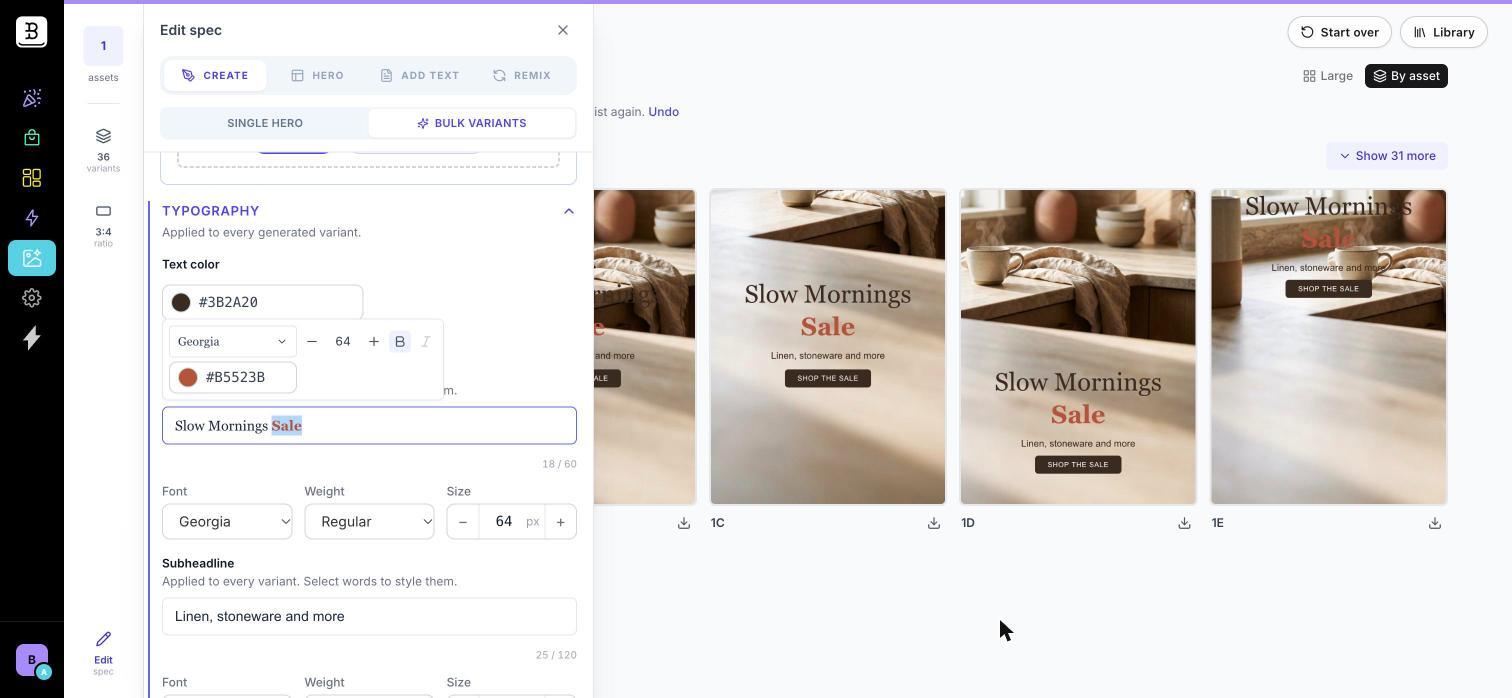
Apply branded typography across a set of hero variants.
These controls are live for all accounts in both Single and Bulk Create. One thing to note—In Bulk, automated checks don't fully review styled words and extras yet, so give those details a quick visual pass before you send.
Why it matters: Your offer stack, the fine print and the logo placement used to get finished outside of Backstroke. Now they live with the rest of your hero, and all are editable when the offer changes at the eleventh hour.
Give Creative Loops More of Your Own Creative
Last month, we gave you a first look at Creative Loops. Now access is expanding.
As a quick reminder, Creative Loops take the hero image you were already planning to send and create new versions to compete against it. Backstroke checks each new image for quality and predicts how different groups of your subscribers will respond. It then tells you which image each audience should get, or whether you should just send your original hero.
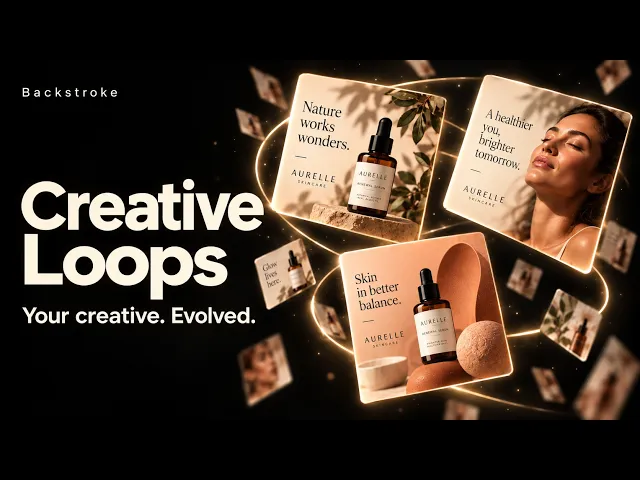
Mix in your photography. Upload or choose up to 12 photos from your Library to run alongside generated backgrounds. Your photos receive the campaign copy, go through the same quality checks and compete with generated options for a spot in the set.

Mix your brand's photography into a Creative Loop alongside AI-generated backgrounds.
A new image model behind the scenes. Nano Banana 2.1 now generates backgrounds across Create, Bulk Variants, the Hero tab and Loops. Our internal evaluation noted cleaner background transitions, but as always, you are their final reviewer.
While it’s still in Beta, we’re opening up Creative Loops to more customers over time. If you already have it, you can start mixing in your own photos today. If you don’t, reach out and we’ll help you get access.
Why it matters: Your best shoots shouldn't sit on the bench. Start with assets your brand already trusts, put them next to fresh options and see which ones each audience is predicted to prefer.
Take the Winning Set Into a Draft Campaign
In September, we showed you how to send personalized results to Klaviyo content blocks. This update brings the whole predictive set into Backstroke's own campaign workflow.
From a Creative Loop: Add its recommended set to a draft campaign, or start a new campaign from it.
From a campaign: Choose an eligible Creative Loop or Surge set from the Hero step or the brief.
Either way: Audience-to-image assignments carry through as-is, with no re-scoring and no reselecting images by hand.

Bring a Creative Loop's recommended set into a draft campaign.

Carry the set's audience-to-image assignments into the campaign without re-scoring.
Why it matters: Once Backstroke matches each audience to its best image, those matches go into your campaign. There's no starting over or picking images all over again.
Even More Changes to Remove Rework
Save an Email Row as an Image
Not every inbox respects your typeface. Gmail doesn't support custom fonts loaded through @font-face, according to Can I Email's support data, so a carefully set headline can arrive in a fallback font with different spacing. Now you can save a branded headline or banner row as an image, so it keeps the look you designed.
There are a few trade-offs to keep in mind. A converted row has one link, its text is no longer editable and its columns won't stack on mobile. That makes it a smart option for specific rows, like a promo banner, rather than a whole email. Row-as-image is enabled per account on request.

Start with a branded row in the email editor, then save it for reuse.
Edit Your Brief Without Starting Over
Before you generate, you can now change your campaign's copy instructions while keeping your selected hero, products and template. Already generated the email? Duplicate the campaign, revise the brief and generate again.
Why it matters: Small changes should stay small. A late headline fix or a tweak to the brief no longer means redoing work you've already finished.
Plus, a Few Updates Coming Soon
Here are a few other things—which aren’t yet live—but still worth looking forward to.
Shopify products will be in the brief. Choose products or collections directly while briefing a campaign, with synced prices, photos and links.
A sharper email writer is coming. An updated email-generation model designed to follow your brief more closely, so there's less editing after generation.
Predictive Hero v2 is on the way. Our next prediction model uses richer audience groupings, built around six demographic dimensions, to match hero images to different subscribers.
More of Your Brand, Starting Now
The new hero creative controls and the editable brief are live today. Creative Loops photo support, predictive-set handoffs and row-as-image are available for enabled accounts.
Already a customer? Open Hero Lab and try the new creative controls on an upcoming campaign. Want Creative Loops, predictive-set handoffs or row-as-image turned on? Contact your Backstroke team.
Not a customer yet? No worries. Book a demo and we'll show you how branded creative and audience-level image selection fit into your campaign workflow.

